MOCO for Rocket Routine OS
Set up in 5 minutes
Agents working for you read your projects, tasks, budgets, customers and the hours you can see in MOCO, and prepare hours for you. Nothing is booked in MOCO until you approve it. Each person connects their own MOCO login.
In MOCO, once, done by your MOCO administrator:
- Open Settings, Account, KI (Beta) and switch on the AI access.
- If agents should book hours (after each person's approval), allow writing there, not only reading.
In Rocket Routine OS, done by each person, under Settings, Connections, MOCO:
- Enter your company's MOCO address (https://yourcompany.mocoapp.com, nothing after it).
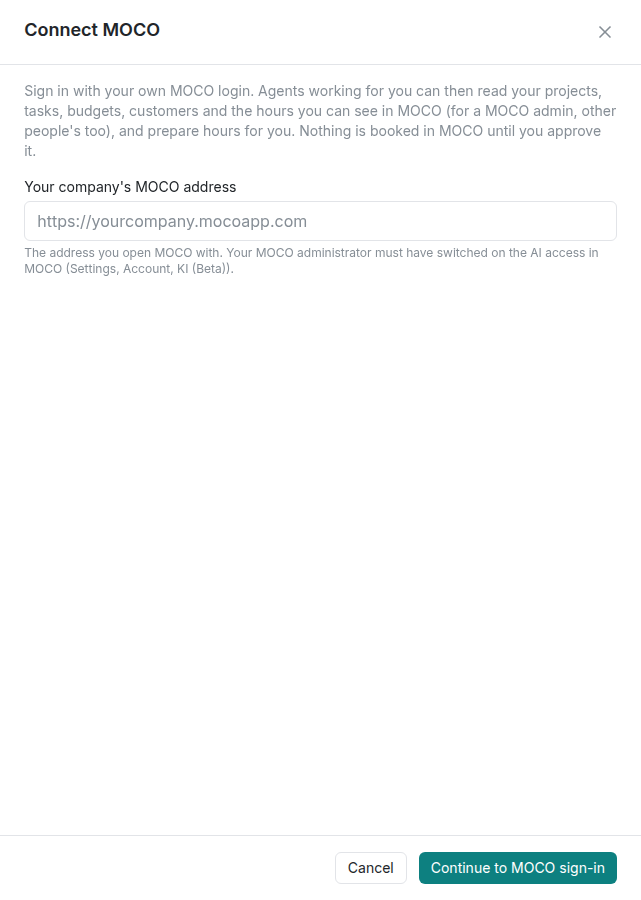
- Click Continue to MOCO sign-in and sign in with your own MOCO login.
- Allow reading and booking hours.
The three most common snags
- "That isn't a MOCO address": enter only the address you open MOCO with, without anything after it.
- You cannot connect at all: the AI access in MOCO is not switched on yet (MOCO, Settings, Account, KI (Beta)).
- Hours cannot be booked: your sign-in or MOCO's setting allows only reading. Reconnect and allow booking, or ask your MOCO administrator.
Details
The permissions and why
| What you allow | What agents can then do | Why |
|---|---|---|
| Reading | your projects and the tasks you can book on, project budgets, customers, the hours you can see in MOCO, MOCO's own suggestions for a day | answering questions, preparing a week, checking a budget |
| Booking | prepare hours for you, which you approve in the Inbox before anything is booked | so you do not have to type your hours yourself |
Agents read with your own MOCO rights: what you cannot see in MOCO, they cannot see either. If you are a MOCO admin, that includes other people's hours; agents then always say whose hours they report.
Invoices, offers, leads and purchases are not available through this connection.
Reading and booking
- Every booking waits for you. An agent prepares the hours (date, hours, project, task, text), and a card appears in your Inbox. Only you can approve it, not an admin and not anyone else in the chat. Then the hours are booked once, on the date given.
- A wrong booking cannot be changed or deleted from Rocket Routine: correct it in MOCO by hand. So check date, hours and task before you approve.
- Read only: if your sign-in or MOCO's own setting allows only reading, agents can still read, but no hours can be booked.
- Nothing is booked in MOCO before you approve it, whatever level the agent works at.
What agents can do with it (examples)
- "Which projects can I book on, and how much budget is left in the website project?"
- "What did I book last week?"
- "Book 1.5 hours yesterday on the onboarding project for the kickoff workshop." (you approve the card first)
- "Find the customer Example Ltd in MOCO and show me its projects."
- "Show me MOCO's suggestions for today and prepare the hours." (each entry waits for your approval)
When it does not work
What Rocket Routine OS shows, and what to do:
- "Enter your company's MOCO address, for example https://yourcompany.mocoapp.com." The address field is empty.
- "That isn't a MOCO address. It must look like https://yourcompany.mocoapp.com, with nothing after it." Enter only the address you open MOCO with, without a path.
- "This sign-in only allows reading, so hours can't be booked. Reconnect and allow booking, or ask your MOCO administrator (MOCO, Settings, Account, KI (Beta))."
- "Your MOCO sign-in has ended or was withdrawn. Reconnect to keep using it."
- You cannot connect at all: your MOCO administrator has not switched on the AI access yet (MOCO, Settings, Account, KI (Beta)).
- When MOCO itself says no to a request, the agent passes on MOCO's own reason in plain words.
Good to know
- Your MOCO sign-in belongs to you. Only you, and the agents you allow when they work for you, can use it.
- You can withdraw it at any time, in Rocket Routine OS or in MOCO.