
Rocket Routine OS is feature complete
Every function planned for the pilot is built. Now come 2 to 3 weeks of testing, then the pilot projects start. This is what the system does today.
Over the last weeks I rebuilt almost everything in Rocket Routine OS. Today I can say it: the system is feature complete. Every function I planned for the pilot projects is built.
What feature complete means
Feature complete means every planned function is built. Not everything is tested yet. The numbers in my new overview video are test data, and I still have to check some connections. I am planning 2 to 3 weeks of testing for that. After that, the pilot projects can start.
Rocket Routine OS is still in active build and comes in November 2026.
Talk to your company
I wanted to run the whole company with agents: steer it, watch it, and have the work done. For that I rebuilt the chat from the ground up.
The result in one sentence: talk to your company. It answers, it gets the work done, and you decide.
The agents can do everything you can do in the software yourself. You say: "Create a goal for me." The agent asks what is missing and creates it. Or you say: "I need a new skill for my agent." Then the agent builds it. The menus are still there, for overview and for hand work. In daily use, you talk to the system.
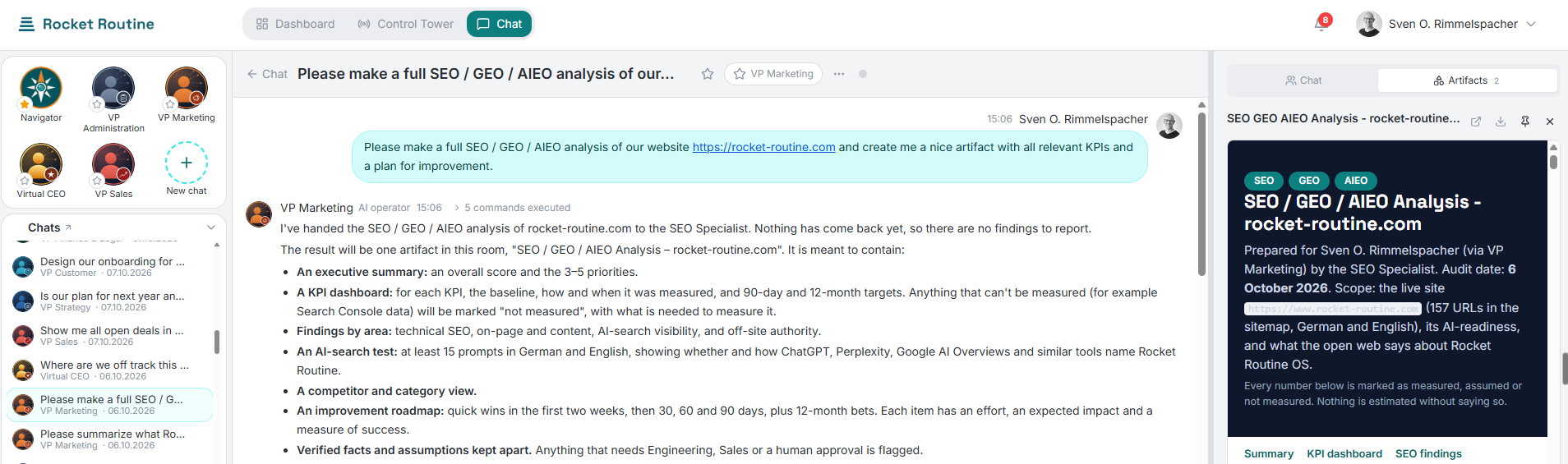
A chat in Rocket Routine OS: I ask the VP Marketing to analyse our website. On the right, the result is being created as a document.
The sidebar: four cards
On the left you see four cards: agents, chats, the Inbox and your next meetings.
The Navigator is the central agent and your daily point of contact. With the Navigator you work out what to do next. When it needs help, it brings in others, for example a developer, a tester or the VP (Vice President) Marketing, and hands them tasks. The Navigator also leads the meetings.
You can leave a chat and close your laptop. The agents keep working and report back when they are done.
From an answer to work
In the video I ask the Navigator for the yearly goals and then bring the VP Sales into the chat. I mark its answer and turn it into a work item, a single work package. Title and description come from the text. The area is already set correctly, and the VP Sales is listed as the responsible one. I have the definition of done, meaning how we can tell the work was done well, suggested for me. On save, the work item lands in the responsible person's Inbox.
In the same way you turn an answer into a goal, a knowledge item or a principle, or you change the mission. You add people to the chat as you would in Teams or Slack.
The Inbox collects everything
Everything that has to reach me ends up in the Inbox: orders, decisions, results, and my e-mails, pre-sorted.
One example from the video is the Daily News Digest. A workflow scans the main news sites and puts an HTML file in my Inbox. As a routine, it runs every morning at seven. In the video I start it by hand, and shortly after, the Inbox count goes from 33 to 34.
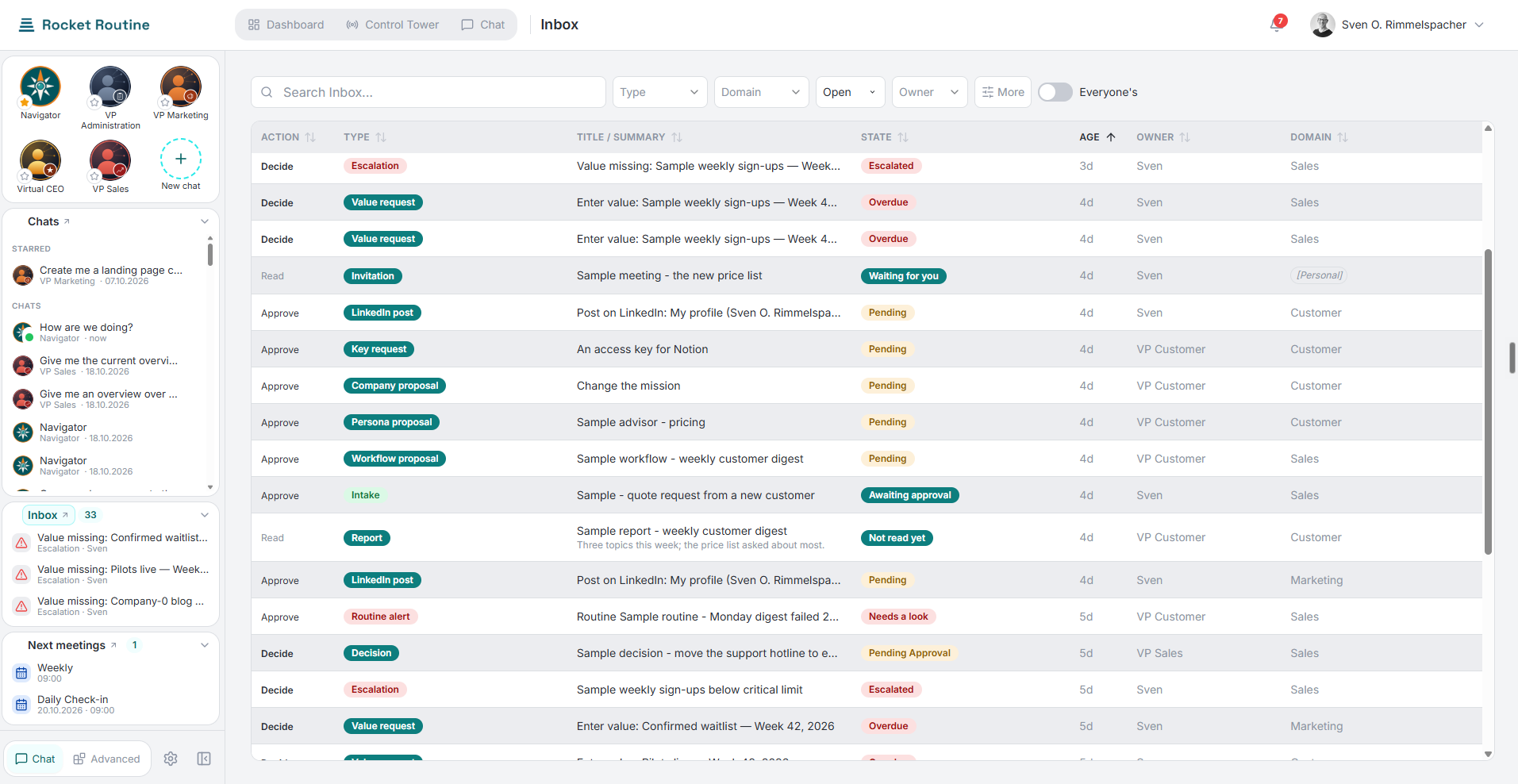
The Inbox in Rocket Routine OS: requests, approvals and reports with type, status, owner and area. The entries are sample data.
When an agent needs an answer from me, it assembles a question window on its own. I did not program that window in advance.
New agents are created in conversation
There are two types: regular agents such as content marketer, developer or project manager, and the VPs, who each own an area.
I do not write instructions by hand. I tell the Navigator that I need a new marketing agent and what it should be able to do. It asks me a few questions, creates the agent and writes the instructions. If something is missing later, I tell the agent in conversation.
For each agent I set the model, skills, tools and connections. You also set an adoption level for each agent: Shadow only suggests, Copilot handles everyday things itself, Autopilot may also take care of structural things itself. You decide how much each agent does on its own. The agent knows your company, meaning goals and metrics, so you do not have to explain them every time. Nothing leaves the company without your yes.
Six building blocks and the connections
The system is built from six blocks: agents, skills, teams, workflows, routines and knowledge. A team is a group of agents, for example an advisory circle made of knowledge personas that you add to a chat with one click.
Any tool can be connected. Today there are about two dozen connections, for example Google Workspace and Microsoft 365. On top of that come MCP servers, webhooks, e-mail channels as input, and any system with an API. How that works in principle, I show with Trello: I tell an agent to create a card in my Trello board, and I do not have to look into that tool myself. I still have to test some connections.
What comes next
Now I test everything again from the start. That takes 2 to 3 weeks. After that, the pilot projects can start.
In the next days I will write to the people at the front of the waitlist and ask who still wants to join the pilot phase. In the coming weeks I will show the individual functions in detail.
How to join
Sign up for the waitlist: join the waitlist, at the bottom of the home page. The whitepaper shows the current state of the system and why I built it this way.
*Sven Rimmelspacher*
Want to build this in your own company?
Rocket Routine OS is the operating system behind these articles, and it is not open yet. Join the waitlist and you hear first, get a fortnightly honest account of what is working and what is not, and move further up the list with every referral.
Join the waitlistWant to understand the whole system?
The entire architecture of Rocket Routine OS as a PDF — 20 pages, freely available, no form required.
Download whitepaper (PDF)