Confluence and Jira (Atlassian) for Rocket Routine OS
Set up in 10 minutes
Your agents read and search your Confluence pages and Jira issues and, if you allow it, create pages, issues and comments. The connection uses the API token of one Atlassian account: agents can do exactly what that account can do, and never see the token.
In Atlassian, done by your Atlassian administrator:
- Choose the account. Best: a separate account for Rocket Routine (for example rocket-routine@example.com).
- Give it access only to the Confluence spaces and Jira projects agents should use (view, and edit if agents may write).
- Create the API token. Signed in as that account, open https://id.atlassian.com/manage-profile/security/api-tokens, choose Create API token (not "Create API token with scopes": a scoped token does not work here), set a name and an expiry date, and copy the token at once.
In Rocket Routine OS, done by an Admin, under Settings, Connections, the Atlassian entry (Confluence, Jira):
- Enter your site address (https://yourcompany.atlassian.net, nothing after it), the account's e-mail and the API token.
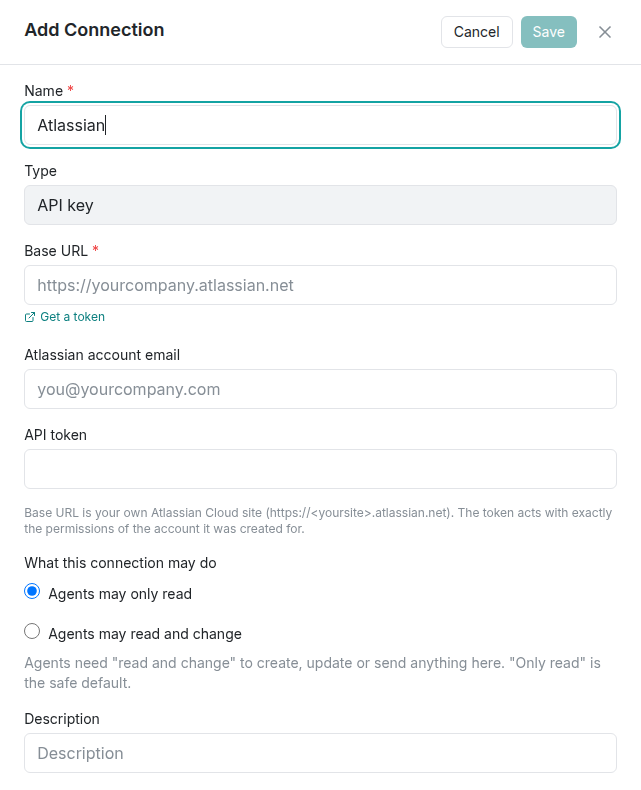
- Choose Agents may only read or Agents may read and change.
- Click Save. Rocket Routine checks the connection right away ("Verifying connection…"). If the check fails, correct the entry and use Retry. Later you can check again from the connection's menu with Test & view tools.
The three most common snags
- The site address is refused: enter only https://yourcompany.atlassian.net, with nothing after it.
- The token is rejected: copy it again completely, check it has not expired, and check the e-mail belongs to the account that created it. If it was made with "Create API token with scopes", create a classic one with "Create API token" instead.
- An agent cannot find a page you can see: the account behind the token cannot see it. Give that account access to the space or project.
Details
The permissions and why
There are no separate permissions to tick: the token acts with the rights of its account. That is why the account matters.
| What the account can do | What agents can then do |
|---|---|
| view a Confluence space | read and search its pages |
| edit a Confluence space | create and change pages (only with "read and change") |
| browse a Jira project | read and search its issues |
| create and comment in a Jira project | create issues and comments (only with "read and change") |
Attachments to pages and issues work with "read and change", for files that are already in Rocket Routine (up to 4 MB).
Read, or read and change
- Set per connection: "Agents may only read" or "Agents may read and change". Searches and other reads always work.
- Agents at the Shadow level never change anything in a connected service, whatever the connection allows. They say what they would change, and an Admin can raise their level.
- The account's own rights in Atlassian always apply on top: what the account may not do, agents may not do either.
What agents can do with it (examples)
- "Find our Confluence page about the onboarding process and summarise it."
- "What is still open in the Jira project WEB?"
- "Create a Jira task for the bug the customer described, in project SUP."
- "Write the meeting notes from today as a page in the Team space."
- "Which pages in the Sales space were changed this week?"
When it does not work
What Rocket Routine OS shows, and what to do:
- "The base URL must be your own Atlassian Cloud site, like https://yourcompany.atlassian.net." Enter only your site address, with nothing after it.
- "Atlassian needs both your account email and an API token." Fill in both fields.
- "Atlassian rejected this credential — check it was copied completely and has not been revoked." Copy the token again, completely, or create a new one. Check that the e-mail address belongs to the account that created the token.
- "Could not verify with Atlassian right now (no clear answer). The credential was saved but NOT confirmed — try "Test & view tools" again shortly." Atlassian did not answer clearly; check again in a few minutes (the connection's menu, Test & view tools).
- An agent says Atlassian needs reconnecting: the token has expired or was revoked. Create a new one and save it in the connection.
- An agent cannot find a page or an issue you can see: the account behind the token cannot see it. Give that account access to the space or project.
- An agent says it may only read: "Not done: agents may only read through this connection. An Admin can allow changes under Settings, Connections."
Good to know
- The token is stored encrypted and is never shown again. Agents never receive it.
- When the token expires, create a new one and save it in the connection.
- Jira and Confluence use the same connection.
- A personal Atlassian account works too, but then agents see everything that person sees. A separate account limits what they can reach.