Trello for Rocket Routine OS
Set up in 10 minutes
Your agents read your Trello boards, lists and cards and, if you allow it, create, move and change cards. The connection uses the key and token of one Trello account: agents see exactly the boards that account sees, and never see the key or the token.
Enter these values only in your own Rocket Routine OS app, at your own address. We never ask you to send keys or secrets by e-mail or chat.
In Trello, once, by the person whose account is used (they must be an admin of a Trello Workspace):
- Choose the account. It will see every board agents should use. Cleanest: a member of only the boards that matter.
- Create a Power-Up. Open https://trello.com/power-ups/admin (the Trello form in Rocket Routine OS links there: Get a token, under the address field), choose New, give it a name (for example "Rocket Routine") and your Workspace, and save. You do not need an iframe address.
- Create the API key. In the Power-Up, under API key, click Generate a new API key and copy the API key.
- Create the token. Next to the API key there is a Token link. Click it, allow access with the chosen account, and copy the token Trello then shows.
In Rocket Routine OS, done by an Admin, under Settings, Connections, Trello:
- Enter the API key and the token in the two fields.
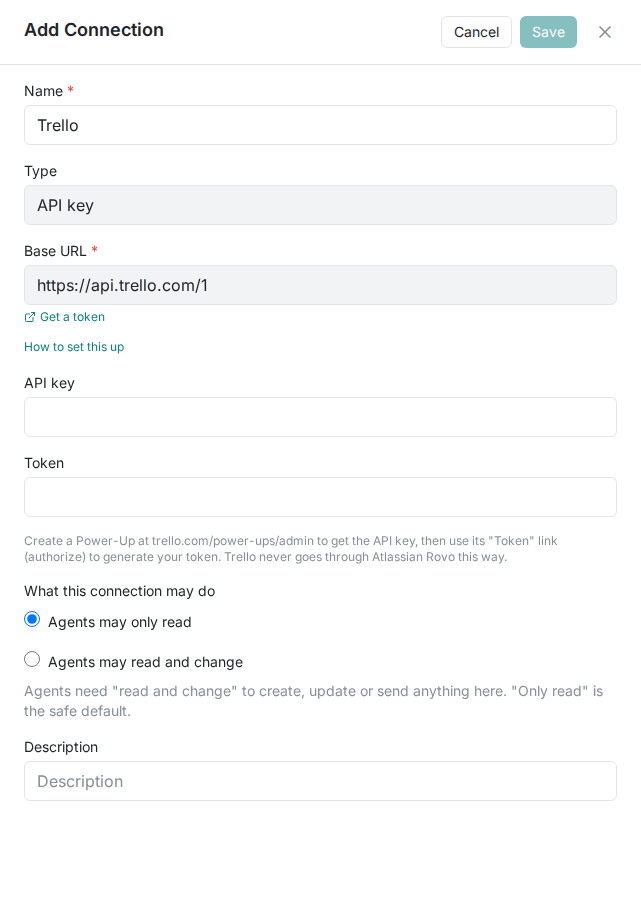
- Choose Agents may only read or Agents may read and change.
- Click Save. Rocket Routine checks the connection right away ("Verifying connection…"). If the check fails, correct the entry and use Retry. Later you can check again from the connection's menu with Test & view tools.
The three most common snags
- The check fails: key and token were swapped or not copied completely. The API key is the shorter one; the token is the long value Trello shows after "Allow".
- An agent cannot find a board you can see: the account behind the token is not a member of that board. Add it to the board.
- You cannot create a Power-Up: your account is not an admin of any Trello Workspace. Ask a Workspace admin to create it, or to make you an admin.
Details
The permissions and why
There are no separate permissions to tick: the token acts with the rights of its account. That is why the account matters.
| What the account can do in Trello | What agents can then do |
|---|---|
| see a board | read and search its lists and cards |
| edit cards on a board | create, move, change and comment on cards (only with "read and change") |
Read, or read and change
- Set per connection: "Agents may only read" or "Agents may read and change". Reading and searching always work.
- Agents at the Shadow level never change anything in a connected service, whatever the connection allows. They say what they would change.
- The account's own rights in Trello always apply on top: what the account may not do, agents may not do either.
What agents can do with it (examples)
- "What is in the In progress list on our Client projects board?"
- "Add a card to the Ideas list on the Marketing board for a LinkedIn post about the new website."
- "Move the card Offer Example Ltd to Done."
- "Which cards are overdue, and who owns them?"
When it does not work
What the check after Save can show (the app shows these in English):
"Trello rejected this credential — check it was copied completely and has not been revoked." Copy the value(s) again completely, or create new ones.
"Could not verify with Trello right now (no clear answer). The credential was saved but NOT confirmed — try "Test & view tools" again shortly." The service did not answer clearly; check again in a few minutes (the connection's menu, Test & view tools).
The check on Save fails: copy the key and the token again completely, each into its own field.
An agent says Trello needs reconnecting: the token was revoked (in Trello under Settings, Applications) or the account was removed. Create a new token and save it in the connection.
An agent cannot find a board or a card: the account behind the token cannot see it. Add it to the board.
An agent says it may only read: "Not done: agents may only read through this connection. An Admin can allow changes under Settings, Connections."
Good to know
- The key and token are stored encrypted and never shown again. Agents never receive them.
- You can withdraw access at any time in Trello (Settings, Applications), or delete the connection in Rocket Routine OS.